Using a potentiometer and PWM on an Arduino to fade an LED.
- /* POT to LED test -> by Owen Mundy March 11, 2010
- from: http://itp.nyu.edu/physcomp/Labs/AnalogIn
- —————————————————————*/
- int potPin = 0; // Analog input pin that the potentiometer is attached to
- int potValue = 0; // value read from the pot
- int led = 9; // PWM pin that the LED is on. n.b. PWM 0 is on digital pin 9
- void setup() {
- // initialize serial communications at 9600 bps:
- Serial.begin(9600);
- // declare the led pin as an output:
- pinMode(led, OUTPUT);
- }
- void loop() {
- potValue = analogRead(potPin); // read the pot value
- analogWrite(led, potValue/4); // PWM the LED with the pot value (divided by 4 to fit in a byte)
- Serial.println("hello"); // print the pot value back to the debugger pane
- delay(10); // wait 10 milliseconds before the next loop
- }
Here is the schematic for the above project.
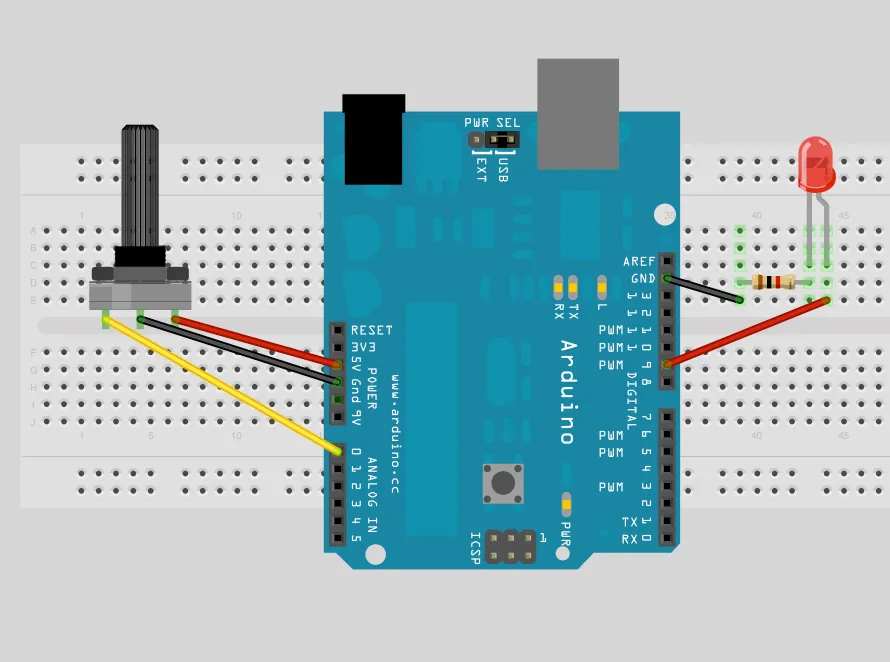
Using PWM and a potentiometer to fade an LED and drive a stepper motor, powered by a Boarduino RBBB.
- /*
- Owen Mundy
- July 29, 2009
- p. 262 of Physical Computing
- Using BBB to run stepper motor by manually moving steppers
- */
- int pin1 = 3; // PWM
- int pin2 = 5; // PWM
- int pin3 = 6; // PWM
- int pin4 = 9; // PWM
- int ledpin = 13; // LED
- int led = false; // LED monitor
- int motor_time_lapse = 80;
- int potPin = 0; // Analog input pin that the potentiometer is attached to
- int potValue = 0; // value read from the pot
- int ledPotPin = 11; // PWM pin that the LED is on. n.b. PWM 0 is on digital pin 9
- void setup()
- {
- pinMode(pin1, OUTPUT); // sets the pin as output
- pinMode(pin2, OUTPUT); // sets the pin as output
- pinMode(pin3, OUTPUT); // sets the pin as output
- pinMode(pin4, OUTPUT); // sets the pin as output
- pinMode(ledpin, OUTPUT); // sets the pin as output
- // initialize serial communications at 9600 bps:
- Serial.begin(9600);
- // declare the led pin as an output:
- pinMode(ledPotPin, OUTPUT);
- }
- void loop()
- {
- potValue = analogRead(potPin); // read the pot value
- analogWrite(ledPotPin, potValue/4); // PWM the LED with the pot value (divided by 4 to fit in a byte)
- Serial.println(potValue);
- digitalWrite(pin1, HIGH); // on
- digitalWrite(pin2, LOW); // off
- digitalWrite(pin3, HIGH); // on
- digitalWrite(pin4, LOW); // off
- delay(motor_time_lapse); // wait
- digitalWrite(pin1, LOW); // off
- digitalWrite(pin2, HIGH); // on
- digitalWrite(pin3, HIGH); // on
- digitalWrite(pin4, LOW); // off
- delay(motor_time_lapse); // wait
- digitalWrite(pin1, LOW); // off
- digitalWrite(pin2, HIGH); // on
- digitalWrite(pin3, LOW); // off
- digitalWrite(pin4, HIGH); // on
- delay(motor_time_lapse); // wait
- digitalWrite(pin1, HIGH); // on
- digitalWrite(pin2, LOW); // off
- digitalWrite(pin3, LOW); // off
- digitalWrite(pin4, HIGH); // on
- delay(motor_time_lapse); // wait
- blink();
- }
- void blink()
- {
- if (led == false)
- {
- led = true;
- digitalWrite(ledpin, HIGH); // on
- }
- else
- {
- led = false;
- digitalWrite(ledpin, LOW); // on
- }
- }